PasseTonBillet lets you create an email alert to be notified when a ticket matching your search is listed for sale.
Create an alert
Log in to your account, open the page for the event you are interested in and click Create an alert. You can also start from the Create an alert page and search for your event.
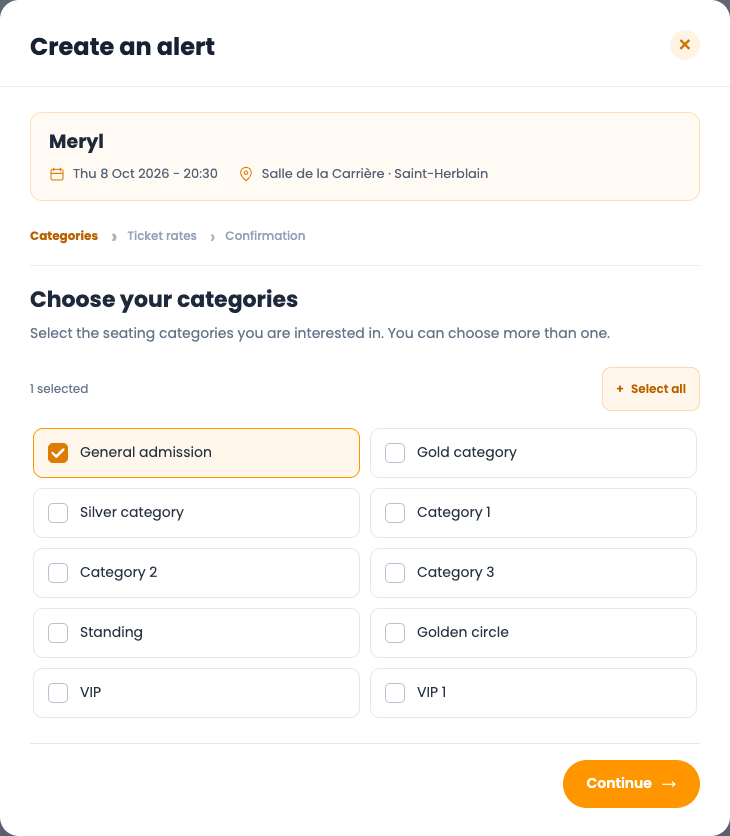
1. Choose your categories
Select the seating categories you are interested in. You can choose several or use Select all, then click Continue.
2. Choose your ticket rates
Select the ticket rates for which you would like to receive an alert, then click Continue. Use Previous to go back and adjust your choices.
3. Choose how many tickets you’re looking for
If the confirmation step lets you choose a ticket quantity, select 1 to 4 tickets in total across your selected categories. For example, if you select two categories and choose 2 tickets, you are looking for 2 tickets in total.
Create a train alert
Log in to your account, then click Create an alert on the Train page or in your search results.
- 1. Your journey — Choose your departure and arrival stations, then click Continue.
- 2. Travel dates — Choose the dates you would like to travel. For a single day, select the same date in both fields, then click Create an alert.
You will receive an email when a ticket matching your chosen route and travel dates is listed for sale.
Edit an alert
From your profile, open My alerts. Expand the relevant alert, then click Modify alert to adjust your criteria and confirm your new choices.
You can see your requested quantity in My alerts and change it by editing the alert.
For a train alert, you can edit the stations and travel dates. If only one alert matches your search, the Modify alert button is also available directly in the search results.
Delete an alert
From My alerts, expand the relevant alert and click Delete this alert.
You can also use the Delete this alert button in an alert email you have received. Once the alert is deleted, you will no longer receive notifications for it.